

IBM MAXIMO
Maximo Application Suite
Home > Maximo Application Suite
IBM Maximo's History
In IBM Maximo, you have long had access to one of the market's 'high-end' EAM systems (Enterprise Asset Management system), known for being the perfect match for the most common business systems on the market, regardless of whether the business system has or does not have system support for EAM in its system solution. In addition to all the functionalities in IBM Maximo, the reason for this is that Maximo supports the applicable standards on an international level and is known for being very integration-friendly.
IBM Maximo Meets the Future
As IBM Maximo evolves into the Maximo Application Suite (MAS) to become a suite of applications that are well-integrated from the start, you gain access to an IEAM system (Intelligent Enterprise Asset Management system). We believe this makes MAS your obvious choice when you want to take your organization to meet the vision of Industry 4.0 by conducting Asset Management in an increasingly data-driven manner.
Another strategically important advantage is that you get a suite of applications that continue to develop within the same ecosystem.

Maximo Application Suite (MAS)
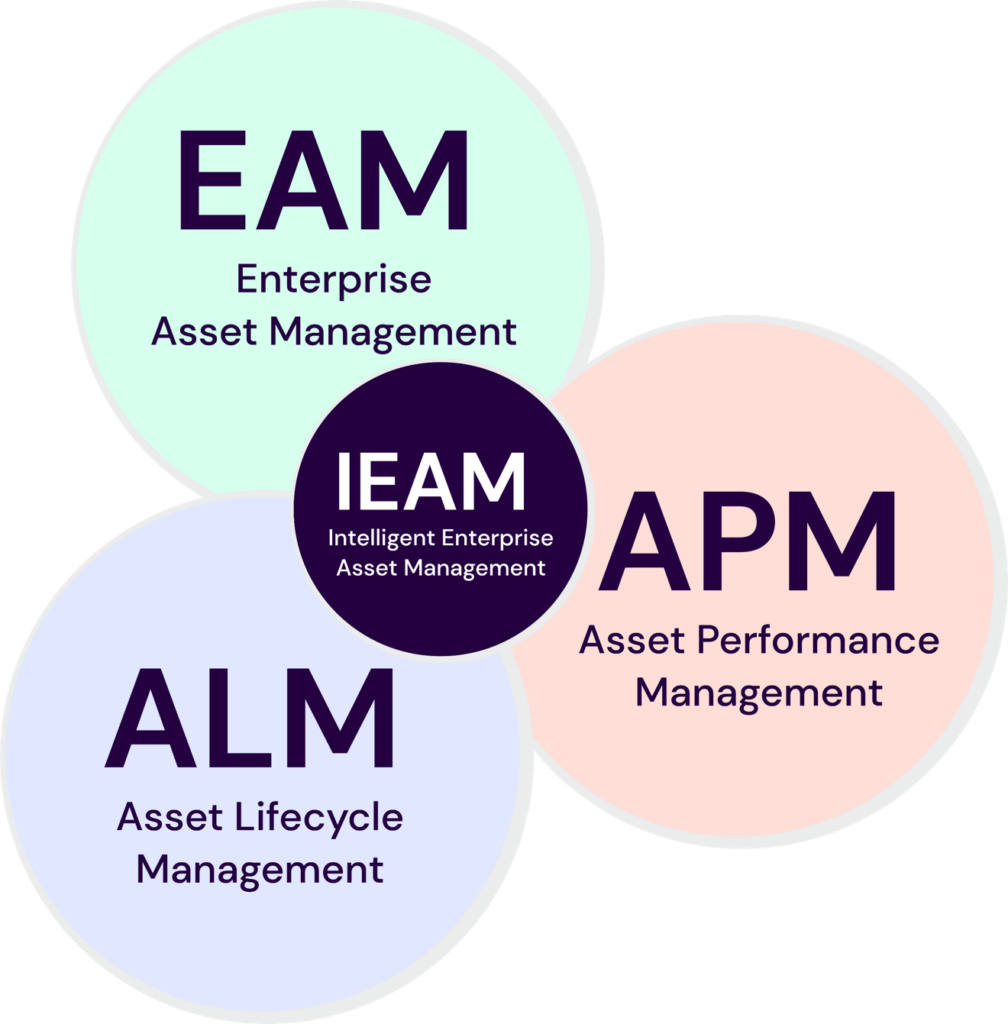
Maximo Application Suite - An Enhanced Support System
“Enterprise Asset Management-system”, EAM systemet i MAS kompletteras med ett “Asset Perfomance Management-system”, (APM) och “Asset Life cycle Management system”, (ALM) vilket ger dig ett utökat stödsystem för att exempelvis:
- Perform condition-based preventive maintenance in a data-driven manner
- Monitor the health of all your equipment to see if there are any that need actions to function better or be replaced.
- Predict what is about to happen and how much time you have until it happens.
Även EAM systemets möjliga funktionalitet kan kompletteras med applikationer som Visual inspection which allows you to perform condition monitoring using a digital camera. If you complement it with the Assist you get system support for managing assistance from a remote colleague or receiving assistance from supporting documentation."
CLICK AND READ
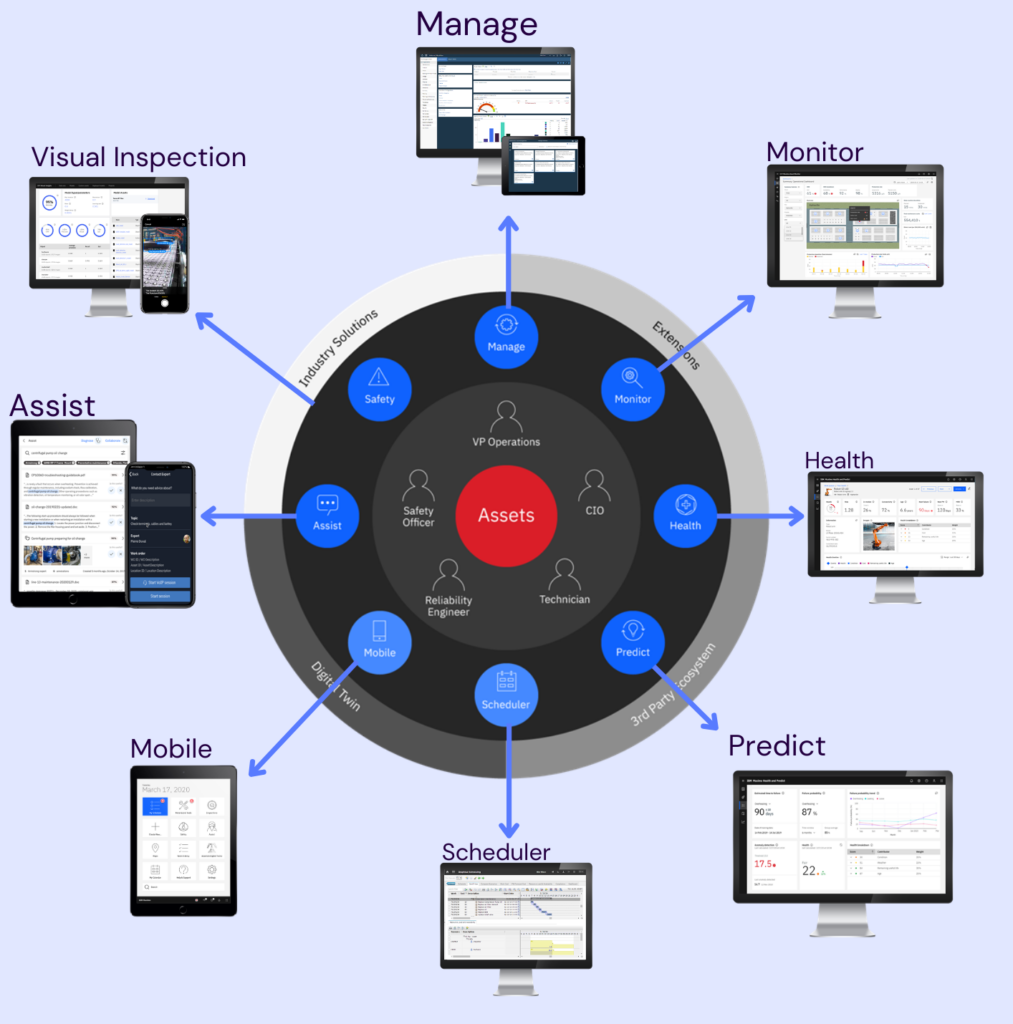
Applications in Maximo Application Suite
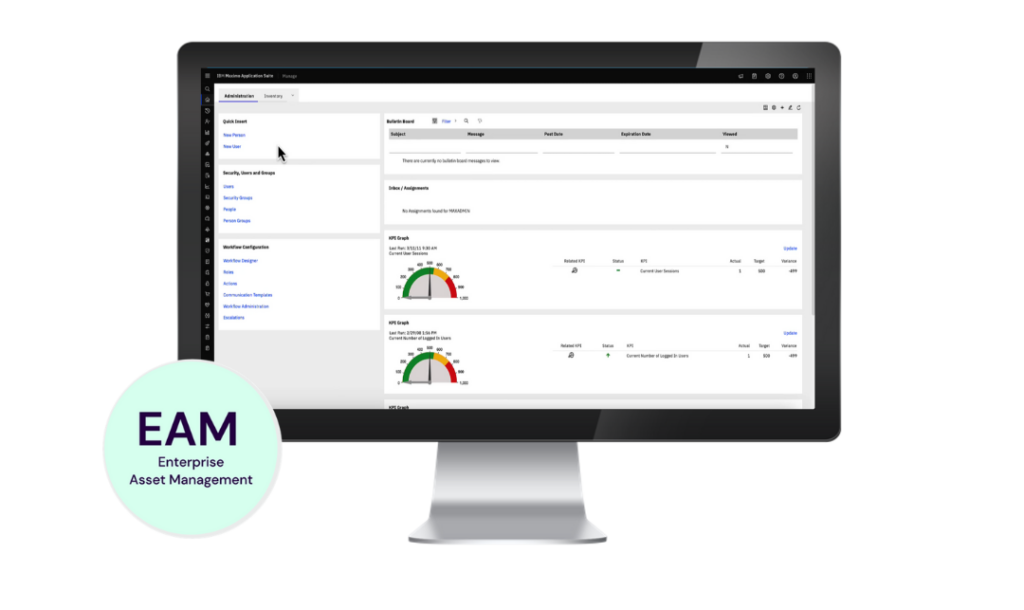
Manage is the main system and can function entirely independently, even though Maximo is now referred to as a "Suite" of applications. For the user, there are only minor differences, apart from a more modern interface. The biggest difference is that Manage can now send EAM data to other applications in the suite, enabling a more data-driven approach to "Asset Management".
Features
- Create asset structures
- Set up spare parts lists
- Schedule preventive maintenance and inspections
- Work instructions
- Order management
- Product catalogs
- Inventory management, procurement, and receiving
- Work Center
Manage also allows you to expand functionality to meet specific industry segment needs. Manage can already be customized for the following industries and sectors:
- Transportation
- Nuclear .
- Utillies .
- Oil & gas .
- Aviation .
- Civil infrastructure .
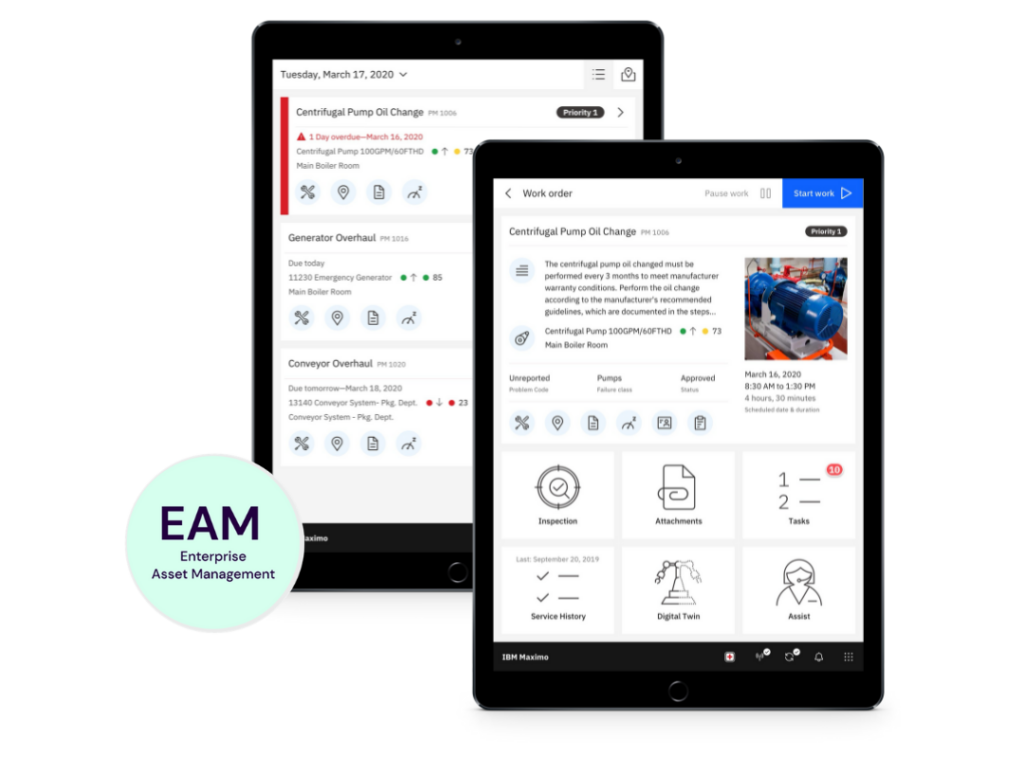
A brand-new mobile solution providing access to the EAM system, both online and offline, while you're in the field. Mobile is also designed to give you, as a user, access to data from other applications in the "Suite."
Features
- Modern mobility with access to necessary information
- AI and remote assistance for field employees
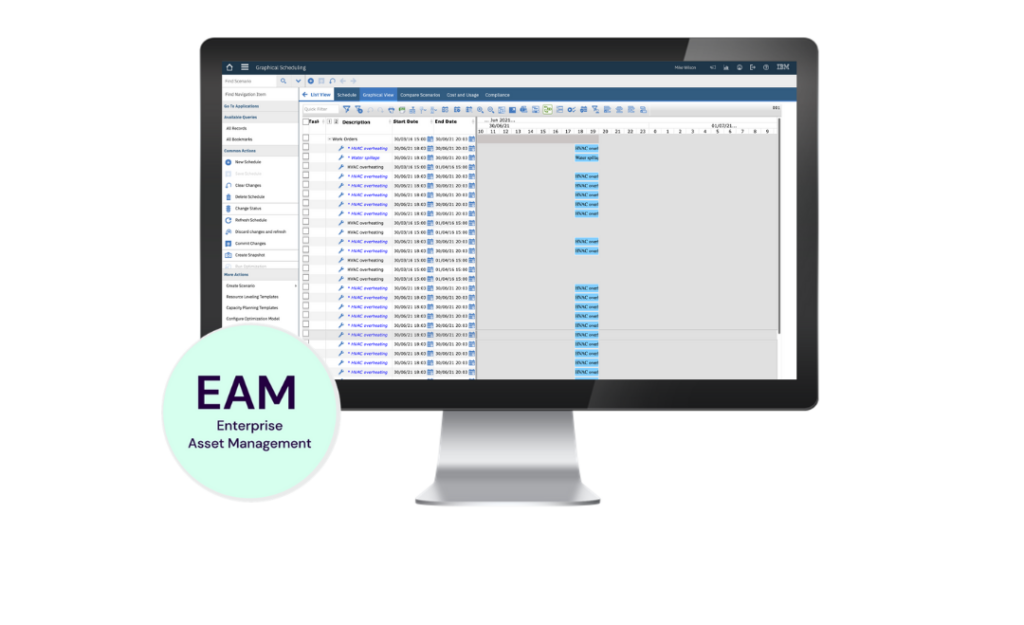
Scheduler is designed for those responsible for planning maintenance work – whether daily tasks or major maintenance periods.
Features
- Visual planning tool
- Drag-and-drop functionality
- Visualization of dependencies and resource requirements
- Critical Path Analysis
- Comparison of different scenarios
- Visual resource management
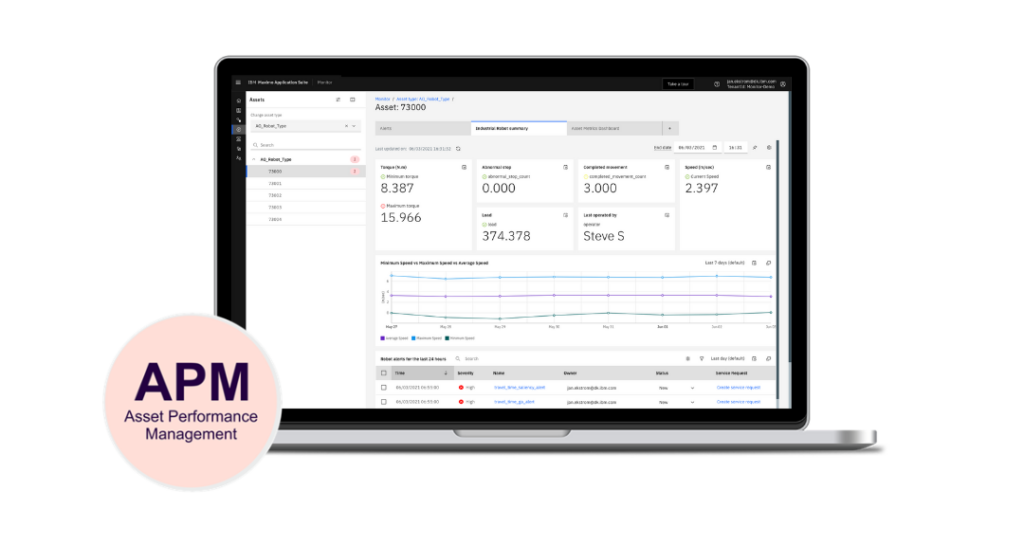
In combination with the Manage application Manage enables you to establish condition-based preventive maintenance using streaming IoT data from your increasingly intelligent components. Monitor also allows you to work visually with IoT data and forward it to other applications in the "Suite", such as Health and Predict.
Features
- Monitoring of measurement data
- AI-based identification of deviations
- Creation of work orders in Manage directly from Monitor
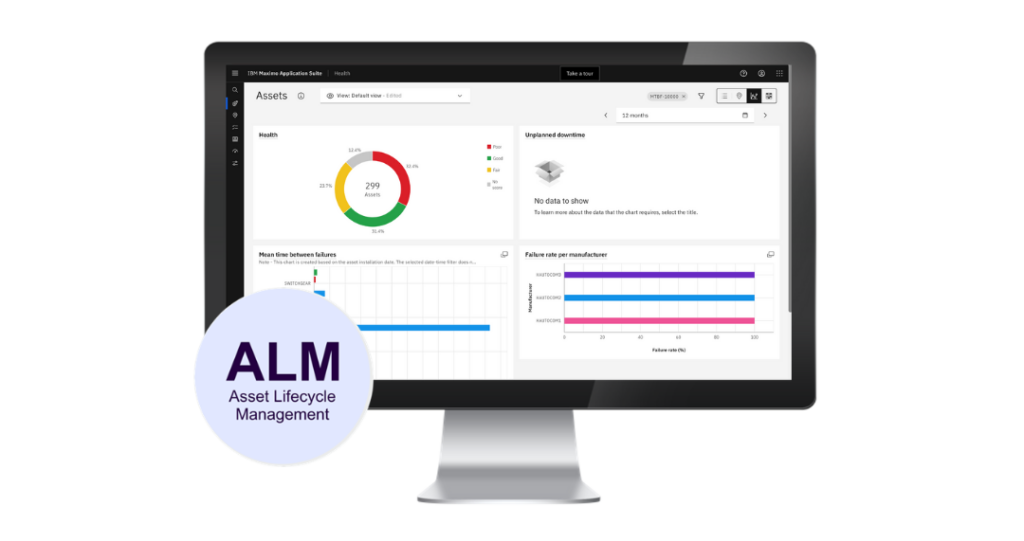
Health monitors the condition of your assets using so-called "Health Scores". In the Health application, you can quickly identify which assets deviate from the desired level. This gives you full control in daily operations with minimal effort, enabling you to focus on handling deviations and taking action only when assets require attention, maintenance, or replacement. Health also works optimally with Predict , allowing you to forecast what is likely to happen and when it is expected to occur.
Features
- Dashboard for both overview and detailed insights into asset conditions
- Condition-based notifications and activitie
- Integration with data from Manage, Monitor and Visual Inspection.
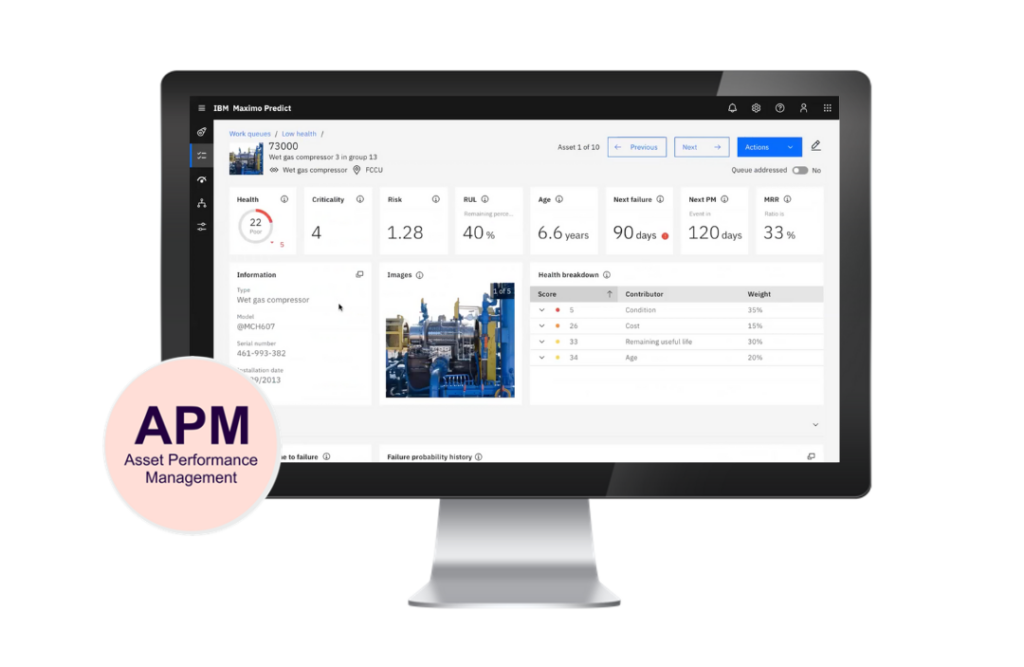
Predict provides system support to forecast future events. Predict can function as a standalone application predicting when unwanted events are likely to occur. This requires a specially developed model within the application to forecast the current sequence of events. Predict also works optimally with Health where an asset's Health Score shows a downward trend. In such cases, Predict can forecast what is likely to happen and when it is expected to occur.
Features
- Create facility-based troubleshooting models
- Predict upcoming events
- Integration with data from Manage, Monitor, Visual Inspection, and Health
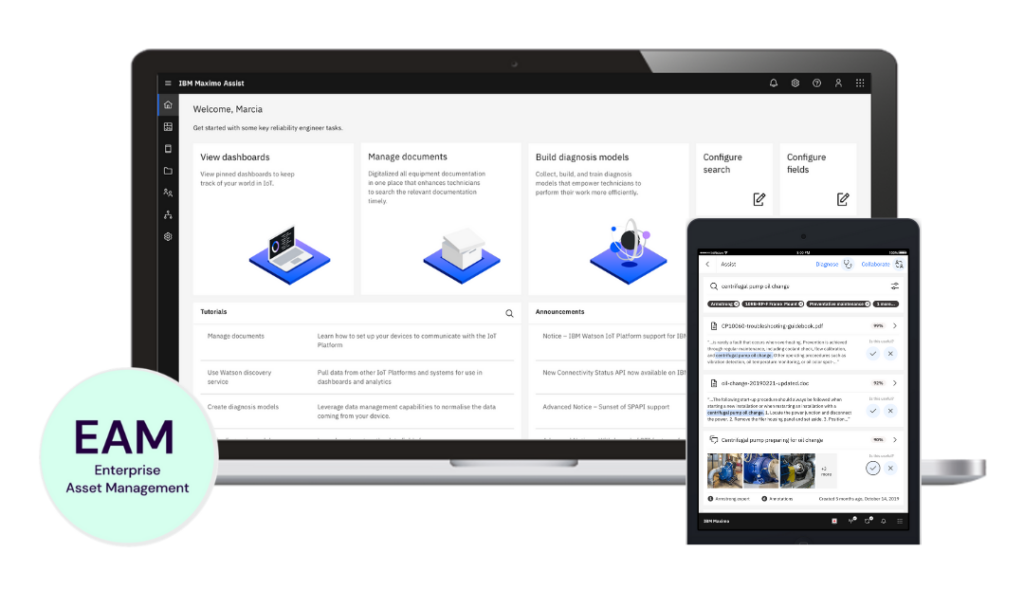
Assist allows you to draw on others' experiences and knowledge to solve problems in the field or at the facility. This can be achieved through guidance from a remote colleague or by searching in a manner similar to "Google," where results are presented in the order deemed most relevant by the system. To maximize effectiveness, high-quality reporting and digitized supplier manuals are required.
Features
- AI-based assistant for maintenance personnel
- AR-enabled functionality for remote support via mobile devices
- Locate troubleshooting and solution instructions from various sources
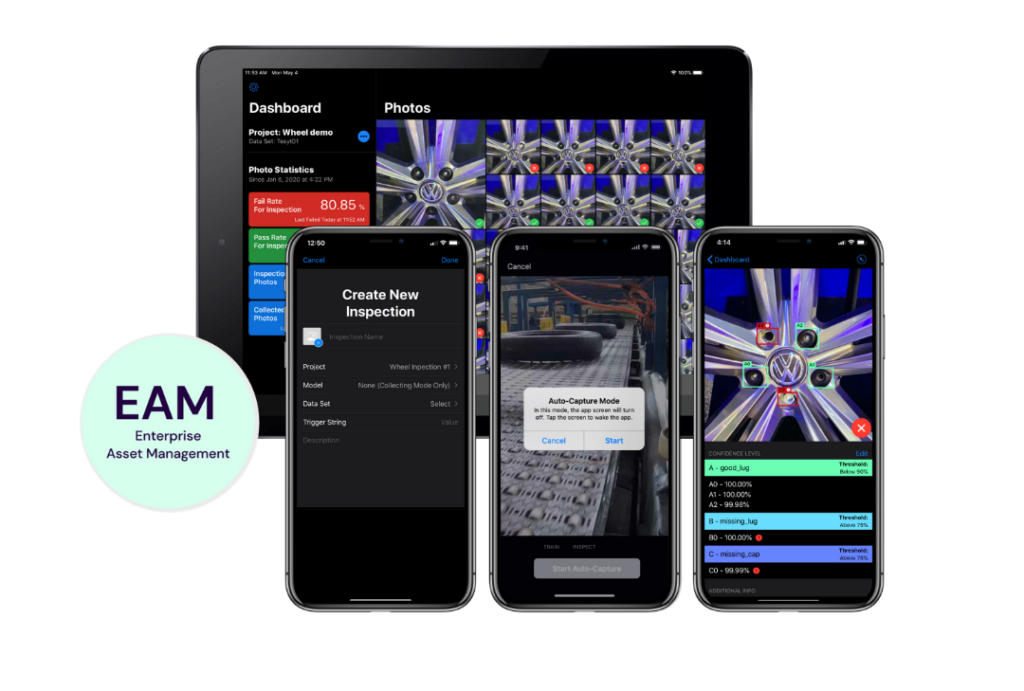
Visual Inspection enhances your ability to perform condition-based maintenance using cameras that detect deviations from expected condition levels. The camera can, for example, be mounted on a drone or temporarily placed on a stand near the area to be monitored.
Features
- Evaluation of image and video information
- Creation of models that can be distributed via IoT, servers, or smart devices
Manage
Manage is the main system and can function entirely independently, even though Maximo is now referred to as a "Suite" of applications. For the user, there are only minor differences, apart from a more modern interface. The biggest difference is that Manage can now send EAM data to other applications in the suite, enabling a more data-driven approach to "Asset Management".
Features
- Create asset structures
- Set up spare parts lists
- Schedule preventive maintenance and inspections
- Work instructions
- Order management
- Product catalogs
- Inventory management, procurement, and receiving
- Work Center
Manage also allows you to expand functionality to meet specific industry segment needs. Manage can already be customized for the following industries and sectors:
- Transportation
- Nuclear .
- Utillies .
- Oil & gas .
- Aviation .
- Civil infrastructure .
Mobile
A brand-new mobile solution providing access to the EAM system, both online and offline, while you're in the field. Mobile is also designed to give you, as a user, access to data from other applications in the "Suite."
Features
- Modern mobility with access to necessary information
- AI and remote assistance for field employees
Scheduler
Scheduler is designed for those responsible for planning maintenance work – whether daily tasks or major maintenance periods.
Features
- Visual planning tool
- Drag-and-drop functionality
- Visualization of dependencies and resource requirements
- Critical Path Analysis
- Comparison of different scenarios
- Visual resource management
Monitor
In combination with the Manage application Manage enables you to establish condition-based preventive maintenance using streaming IoT data from your increasingly intelligent components. Monitor also allows you to work visually with IoT data and forward it to other applications in the "Suite", such as Health and Predict.
Features
- Monitoring of measurement data
- AI-based identification of deviations
- Creation of work orders in Manage directly from Monitor
Health
Health monitors the condition of your assets using so-called "Health Scores". In the Health application, you can quickly identify which assets deviate from the desired level. This gives you full control in daily operations with minimal effort, enabling you to focus on handling deviations and taking action only when assets require attention, maintenance, or replacement. Health also works optimally with Predict , allowing you to forecast what is likely to happen and when it is expected to occur.
Features
- Dashboard for both overview and detailed insights into asset conditions
- Condition-based notifications and activitie
- Integration with data from Manage, Monitor and Visual Inspection.
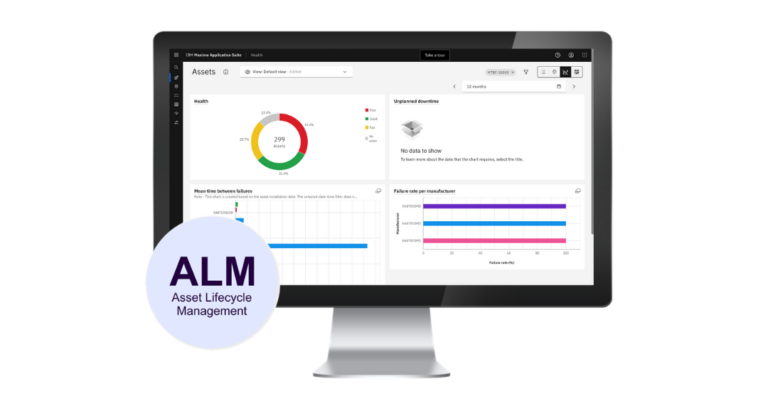
Predict
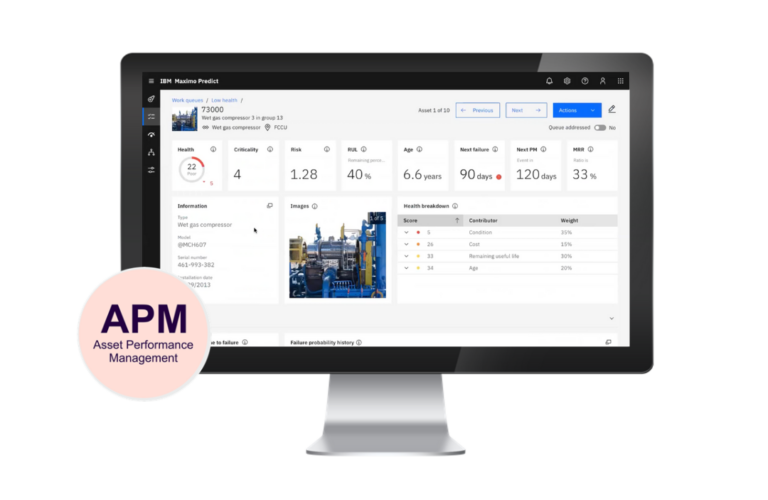
Predict provides system support to forecast future events. Predict can function as a standalone application predicting when unwanted events are likely to occur. This requires a specially developed model within the application to forecast the current sequence of events. Predict also works optimally with Health where an asset's Health Score shows a downward trend. In such cases, Predict can forecast what is likely to happen and when it is expected to occur.
Features
- Create facility-based troubleshooting models
- Predict upcoming events
- Integration with data from Manage, Monitor, Visual Inspection, and Health
Assist
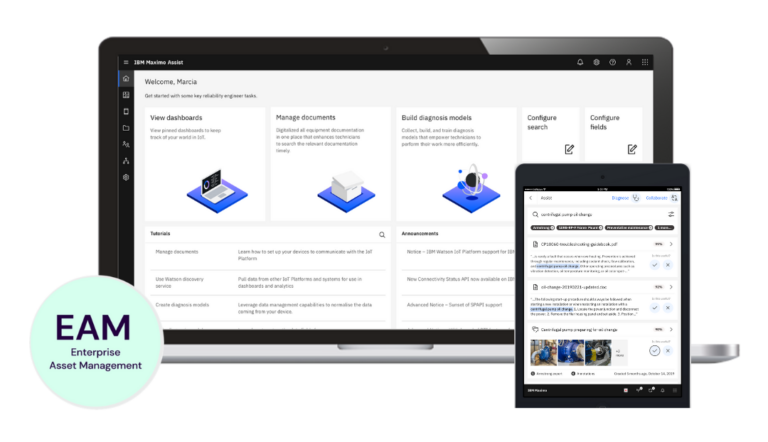
Assist allows you to draw on others' experiences and knowledge to solve problems in the field or at the facility. This can be achieved through guidance from a remote colleague or by searching in a manner similar to "Google," where results are presented in the order deemed most relevant by the system. To maximize effectiveness, high-quality reporting and digitized supplier manuals are required.
Features
- AI-based assistant for maintenance personnel
- AR-enabled functionality for remote support via mobile devices
- Locate troubleshooting and solution instructions from various sources
Visual Inspection
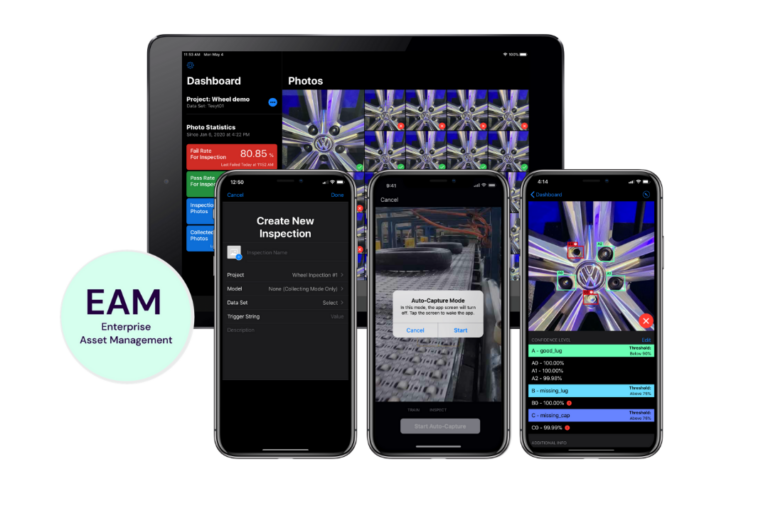
Visual Inspection enhances your ability to perform condition-based maintenance using cameras that detect deviations from expected condition levels. The camera can, for example, be mounted on a drone or temporarily placed on a stand near the area to be monitored.
Features
- Evaluation of image and video information
- Creation of models that can be distributed via IoT, servers, or smart devices
Frequently asked questions
What types of organisations is the EAM system Maximo Application Suite suitable for?
The Maximo Application Suite supports organisations that have invested in equipment, property or infrastructure and need to safeguard their investments throughout their intended lifecycle by implementing Enterprise Asset Management, for example in areas such as maintenance, warehousing, procurement and operations. It also supports organisations that offer Enterprise Asset Management services to their clients.
As the Maximo Application Suite also offers packages of industry-specific functionality – known as Industry Solutions – for sectors such as nuclear power, the oil industry and transport, it is only natural that there are many customers within those sectors.
Historically, organisations using the Maximo Application Suite have tended to be larger companies, corporate groups or government agencies.
In 2025, Epical launched a new version of the Maximo Application Suite under the name Ready Made with the aim of making one of the market’s high-end EAM systems available to medium-sized businesses as well.
As the Maximo Application Suite also offers packages of industry-specific functionality – known as Industry Solutions – for sectors such as nuclear power, the oil industry and transport, it is only natural that there are many customers within those sectors.
Historically, organisations using the Maximo Application Suite have tended to be larger companies, corporate groups or government agencies.
In 2025, Epical launched a new version of the Maximo Application Suite under the name Ready Made with the aim of making one of the market’s high-end EAM systems available to medium-sized businesses as well.
What is the difference compared to other EAM systems (maintenance systems)?
As far as the core functionality of EAM systems is concerned, the similarities outweigh the differences; they include features for managing, for example, asset structures, work orders, preventive maintenance, inventory, procurement, mobility and financial transactions.
Historically, the differences between an entry-level system and a ‘high-end’ system have been linked more to performance, data security, compliance with standards, meeting industry-specific functional requirements, ease of integration with other systems, system support for scheduling, and more advanced mobile solutions.
As we are now at the dawn of the 4th Industrial Revolution – ‘Digitalisation’ – the Maximo Application Suite has been developed to help those who wish to use data to boost their productivity. This includes new functional support for:
Historically, the differences between an entry-level system and a ‘high-end’ system have been linked more to performance, data security, compliance with standards, meeting industry-specific functional requirements, ease of integration with other systems, system support for scheduling, and more advanced mobile solutions.
As we are now at the dawn of the 4th Industrial Revolution – ‘Digitalisation’ – the Maximo Application Suite has been developed to help those who wish to use data to boost their productivity. This includes new functional support for:
- Monitor and visualise the health of your equipment with (Manage, Monitor and Health)
- Predict faults that are about to occur with Predict
- Monitoring status using data from the applications Monitor and Manage
- Streamline RCM (The Reliability, Control and Maintenance) methodology
- AI AI as a search feature
- Visual inspection using a camera and training on what is acceptable and what is not Visual inspection
What are the common mistakes people make when implementing an EAM system?
When choosing a system, it is easy to focus solely on the general IT support needs that the business currently has. A common mistake is failing to account for future needs in the constant pursuit of high productivity and reliable delivery at low cost, as operational reliability is usually crucial to achieving these qualities within a company. This realisation can have a significant impact on which system one should have chosen.
When selecting a supplier, it is not always ensured that the chosen supplier can provide evidence of their ability to implement the system correctly and, following go-live, to continue managing support and development using a delivery model that facilitates proactive management rather than primarily reactive management. This is to ensure effective system support free from incidents and problems.
During implementation, it is common for both the client and the supplier to focus primarily on tailoring the system closely to the business. Whilst this is very rewarding work for all parties, it can lead to future challenges. At Epical, we instead recommend that our clients, when putting the system into practical use, consider not only the system itself but also system support, digital solutions outside the system, organisation and processes. An implementation free from customisations that deviate from the system’s core principles will be much easier to upgrade annually as the system evolves.
When selecting a supplier, it is not always ensured that the chosen supplier can provide evidence of their ability to implement the system correctly and, following go-live, to continue managing support and development using a delivery model that facilitates proactive management rather than primarily reactive management. This is to ensure effective system support free from incidents and problems.
During implementation, it is common for both the client and the supplier to focus primarily on tailoring the system closely to the business. Whilst this is very rewarding work for all parties, it can lead to future challenges. At Epical, we instead recommend that our clients, when putting the system into practical use, consider not only the system itself but also system support, digital solutions outside the system, organisation and processes. An implementation free from customisations that deviate from the system’s core principles will be much easier to upgrade annually as the system evolves.
What are the advantages and disadvantages of an EAM system (maintenance system) as a module within an enterprise resource planning (ERP) system?
The main advantages should be that the system is designed to work well together and that it reduces the number of different systems that need to be managed and developed. These are benefits we highly value, even with the Maximo Application Suite, where several different applications within the EAM system are designed to work optimally together, even though the Maximo Application Suite is strategically designed to integrate with all business systems.
The strongest selling point is usually that business systems and EAM systems are well integrated, as they essentially function as a single system. As we see it, this is often greatly overrated, as EAM systems such as the Maximo Application Suite are designed to integrate seamlessly with all business systems and other support systems on the market.
The most obvious drawback is that the EAM system is often chosen primarily because it is integrated with the selected business system, which may not be the best solution for managing maintenance, warehousing and procurement operations – both in terms of current needs and, perhaps even more so, future requirements. If this is a mistake, progress may stall in the constant quest for increased productivity, as operational reliability is generally crucial to achieving these qualities within a company.
The strongest selling point is usually that business systems and EAM systems are well integrated, as they essentially function as a single system. As we see it, this is often greatly overrated, as EAM systems such as the Maximo Application Suite are designed to integrate seamlessly with all business systems and other support systems on the market.
The most obvious drawback is that the EAM system is often chosen primarily because it is integrated with the selected business system, which may not be the best solution for managing maintenance, warehousing and procurement operations – both in terms of current needs and, perhaps even more so, future requirements. If this is a mistake, progress may stall in the constant quest for increased productivity, as operational reliability is generally crucial to achieving these qualities within a company.
Which applications in the Maximo Application Suite are a good place to start?
The first application to start with is called Manage and this application handles all the basic functions of the EAM system, such as work order management, preventive maintenance, asset structure, stock, purchasing, documentation, supplier data and all financial transactions relating to the EAM system. So, all EAM data is created in Manage which is designed to be able to stream data to other applications in the Suite.
The next application recommended for a basic package is Mobile to give the organisation access to Manage mobile management both online and offline.
Also Scheduler is a good basic application if the maintenance organisation is to implement scheduling in its operations.
The next application recommended for a basic package is Mobile to give the organisation access to Manage mobile management both online and offline.
Also Scheduler is a good basic application if the maintenance organisation is to implement scheduling in its operations.
Which applications in the Maximo Application Suite are designed to boost productivity through the use of data?
In Manage where all EAM data is generated, there are new system tools such as RCM (Reliability Centrale Maintenance) – a system tool based on a database containing extensive background data on components, covering potential malfunctions and appropriate countermeasures. Users can also store their own insights regarding components within their operations. This data then forms the basis for maintenance instructions in Manage. With this system support, you can achieve the same level of maintenance planning as, for example, the aviation industry, but with a significantly lower effort than before. Future AI search functions are also being built into Manage. Manage is designed to be able to stream EAM data to other applications, such as Health.
Monitor is designed to monitor and identify anomalies in the IoT, as well as stream IoT data to Health.
Health is designed to visualise the health of all assets based on EAM and IoT data, in order to identify which assets appear to be in good condition and which require further assessment.
Predict is designed to work in conjunction with Manage, Health and Monitor to predict what is about to happen and when, using data.
Visual inspection nables visual checks using CCTV and machine learning to determine what is acceptable and what is not from a visual perspective.
Monitor is designed to monitor and identify anomalies in the IoT, as well as stream IoT data to Health.
Health is designed to visualise the health of all assets based on EAM and IoT data, in order to identify which assets appear to be in good condition and which require further assessment.
Predict is designed to work in conjunction with Manage, Health and Monitor to predict what is about to happen and when, using data.
Visual inspection nables visual checks using CCTV and machine learning to determine what is acceptable and what is not from a visual perspective.
What is the purpose of the industry solutions in the Maximo Application Suite?
Normally, the core functionality of the Maximo Application Suite application Manage caters to everyone’s needs but there are exceptions in certain industries. Rather than expanding the system with all these industry-specific functions, IBM has instead opted to allow the Manage to be integrated with various industry solutions, thereby adapting the standard Maximo to a specific industry. This offers the advantage of providing tailored system support for a specific industry that still reflects the Maximo standard, thereby laying the groundwork for easier future upgrades.
Can the Maximo Application Suite be integrated with other systems with a reasonable amount of effort?
The Maximo system has always been regarded as highly integration-friendly; for example, it supports APIs and REST APIs as standard integration solutions when Manage is to be integrated with other systems or other data sources.
There are also ready-made integration solutions, such as an SAP connector and MQ, that can be integrated into the system.
Should any challenges arise – which is unusual – when integrating a specific system with standard solutions, Epical has one of Sweden’s largest https://www.epicalgroup.com/services/integration teams at its disposal to resolve the issue.
There are also ready-made integration solutions, such as an SAP connector and MQ, that can be integrated into the system.
Should any challenges arise – which is unusual – when integrating a specific system with standard solutions, Epical has one of Sweden’s largest https://www.epicalgroup.com/services/integration teams at its disposal to resolve the issue.
Can the Maximo Application Suite be populated with data from an existing EAM (Enterprise Asset Management) system?
Yes, importing data from the system being replaced is generally carried out during every new installation.
Is the Maximo Application Suite compatible with Power BI or other BI applications?
The Maximo Application Suite is compatible with Power BI and most other BI tools on the market. IBM’s own BI tool, Cognos, is included in the Maximo Application Suite licence package at no extra cost, provided that data is retrieved solely from the Maximo database.
Should there be a need to supplement the Maximo Application Suite with BI reports, Epical has a dedicated department that works exclusively within DnA focusing on various BI systems such as Power BI, QlikView and Cognos.
Are proactive measures taken to prevent data breaches in the Maximo Application Suite or other adverse effects on data security?
IBM is continuously releasing upgrade solutions to proactively prevent various types of data breaches.
Should there be a need to enhance the high level of data security already built into the Maximo Application Suite as a baseline and as part of a proactive upgrade, Epical has dedicated departments specialising in IAM solutions and Data trust that can develop a solution tailored to your requirements.
Should there be a need to enhance the high level of data security already built into the Maximo Application Suite as a baseline and as part of a proactive upgrade, Epical has dedicated departments specialising in IAM solutions and Data trust that can develop a solution tailored to your requirements.
What types of costs are involved in investing in an EAM system (enterprise asset management system)?
The first cost is the licence fee for the right to use the EAM system, as well as the right to upgrades and support from the software owner. Within the Maximo Application Suite these licences are referred to as ‘AppPoints’. The amount of the licence fee will depend on the extent to which the Maximo Application Suite applications are used in day-to-day operations.
Infrastructure costs: regardless of whether the system is set up as an on-premises solution in your own server room or purchased as a cloud service from a provider, there will be costs for hardware, energy, ongoing maintenance and backup management, or costs for the service itself
A one-off cost for the project to set up, configure and go live with the system
As a rule, organisations also look for a supplier that offers support and system development. In this context, all costs may be variable costs; in other words, if no services are ordered from the supplier, there are no costs incurred. However, certain fixed costs generated by the support service are typically treated as a fixed fee in combination with the variable cost structure.
Infrastructure costs: regardless of whether the system is set up as an on-premises solution in your own server room or purchased as a cloud service from a provider, there will be costs for hardware, energy, ongoing maintenance and backup management, or costs for the service itself
A one-off cost for the project to set up, configure and go live with the system
As a rule, organisations also look for a supplier that offers support and system development. In this context, all costs may be variable costs; in other words, if no services are ordered from the supplier, there are no costs incurred. However, certain fixed costs generated by the support service are typically treated as a fixed fee in combination with the variable cost structure.
What benefits can be expected from investing in an EAM system (maintenance management system) such as the Maximo Application Suite?
An EAM system cannot, in itself, generate any revenue unless it is configured correctly and used properly in day-to-day operations – something we ensure in Epical’s concept All the way to value
Simply by utilising the basic functionality typically found in all EAM systems, you can ensure a swift recovery in the event of a breakdown by keeping spare parts, documentation and tools organised and in order. Preventing breakdowns before malfunctions occur by implementing a preventive maintenance programme that lays a solid foundation for operational reliability. Reducing planned downtime and achieving greater efficiency with the help of the scheduling tool Scheduler
By utilising new features in the Maximo Application Suite which is designed to boost productivity through access to data, entirely new opportunities are created by:
Simply by utilising the basic functionality typically found in all EAM systems, you can ensure a swift recovery in the event of a breakdown by keeping spare parts, documentation and tools organised and in order. Preventing breakdowns before malfunctions occur by implementing a preventive maintenance programme that lays a solid foundation for operational reliability. Reducing planned downtime and achieving greater efficiency with the help of the scheduling tool Scheduler
By utilising new features in the Maximo Application Suite which is designed to boost productivity through access to data, entirely new opportunities are created by:
- Meet equipment requirements for preventive maintenance through a new IT system that enables the RCM (Reliability-Centred Maintenance) methodology with minimal effort compared to previous methods
- Condition monitoring using data and visual inspection with Monitor, Manage and Visual inspection
- Monitor the health of your equipment using the applications Monitor and Health
- Predict faults before they occur with the application Predict
- Find facts quickly using AI solutions
What cost-saving opportunities are available when investing in an EAM system (maintenance management system) such as the Maximo Application Suite?
An EAM system cannot, in itself, generate any cost savings unless it is configured correctly and used properly in day-to-day operations – something we ensure in Epical’s approach All the way to value
Simply by utilising the basic functionality typically found in all EAM systems, it is possible to optimise inventory, procurement and maintenance costs. Effective configuration and correct implementation can often significantly improve efficiency and delivery accuracy in a maintenance operation without staff being expected to ‘work faster’.
By utilising new applications in the Maximo Application Suite which is designed to monitor costs by leveraging access to data, entirely new opportunities are created by:
Simply by utilising the basic functionality typically found in all EAM systems, it is possible to optimise inventory, procurement and maintenance costs. Effective configuration and correct implementation can often significantly improve efficiency and delivery accuracy in a maintenance operation without staff being expected to ‘work faster’.
By utilising new applications in the Maximo Application Suite which is designed to monitor costs by leveraging access to data, entirely new opportunities are created by:
- Monitor the health of your equipment using the applications Manage, Monitor and Health
- Predict costs before they arise using the application Predict
- System support for Enterprise Asset Management for real estate
- System support for IT support
OUR OFFERINGS IN MAXIMO
Purchase or Subscribe to a Package Solution from Us
Purchase
You can purchase your Maximo licenses based on either the number of concurrent users or named users. Choose the solution that best fits your business.
When you own your licenses, it is your responsibility as the owner to ensure you have the necessary number of licenses reflecting your organization’s needs. We can help measure license requirements and, if necessary, adjust permissions and login times to reduce license consumption.

IBM Maximo Application Suite
Your organization owns the solution and the licenses. If desired, Epical can assist with implementing, supporting, managing, and developing your solution.
- Design and own your solution
- Your choice of infrastructure
- Your selection of consultancy, services, and service levels from Epical
Subscribe to a Package Solution: "Tailor Made"
You can subscribe to a tailored service that includes the right to use the Maximo Application Suite. "Tailor Made" is aimed at organizations with over 150 users, often spread across multiple locations or countries. The principle here is to adapt the solution to your company under controlled conditions, providing increased flexibility.

Epical EAM/IEAM "All the Way to Value":
This is a tailored solution specifically adapted to your company under the guidance of Epical specialists. The goal is to ensure the system is used optimally while enabling a solution aligned with IBM’s roadmap for system development in a cost-effective manner.
- Opportunity for a tailored or pre-configured standard solution
- Delivered by Epical as a service
- Your choice of infrastructure
- Customization with additional value-adding services from Epical
- Optional service levels tailored to your needs
Subscribe to a Package Solution: "Ready Made"
You can subscribe to a package solution that grants you the right to use the Maximo Application Suite. Our "Ready Made"concept is ideal for organizations with fewer than 150 users, typically spread across one or two locations. The concept focuses on teaching your organization how to use a pre-configured solution based on our "Best Practice" approach under controlled conditions. This ensures a short implementation time, minimal project effort, and a cost-effective solution.
Epical EAM/IEAM SaaS ”All the may to value – Ready Made”
A standardized, pre-configured solution based on Epical's "Best Practice" and our experience in applying ISO 55000 in practice.
- Access to a ready-to-use, cost-effective solution
- Delivered as a SaaS solution by Epical
- Customization with additional value-adding services from Epical
- Optional service levels tailored to your needs
Contact Us